
I Switched Shell History Tools. Here's Why
Table of Contents
Your shell’s history search is probably slowing you down more than you realize. Whether you’re hammering the up arrow 100 times or fumbling through CTRL + R, there’s a better way.
I’ve used all three approaches: out-of-the-box shell history, McFly, and Atuin. Here’s what I learned.
Out of the Box Shell Search: It Works#
Every shell comes with history search built in. In zsh and bash, you press CTRL + R and start typing.
It’s basic. Really basic.
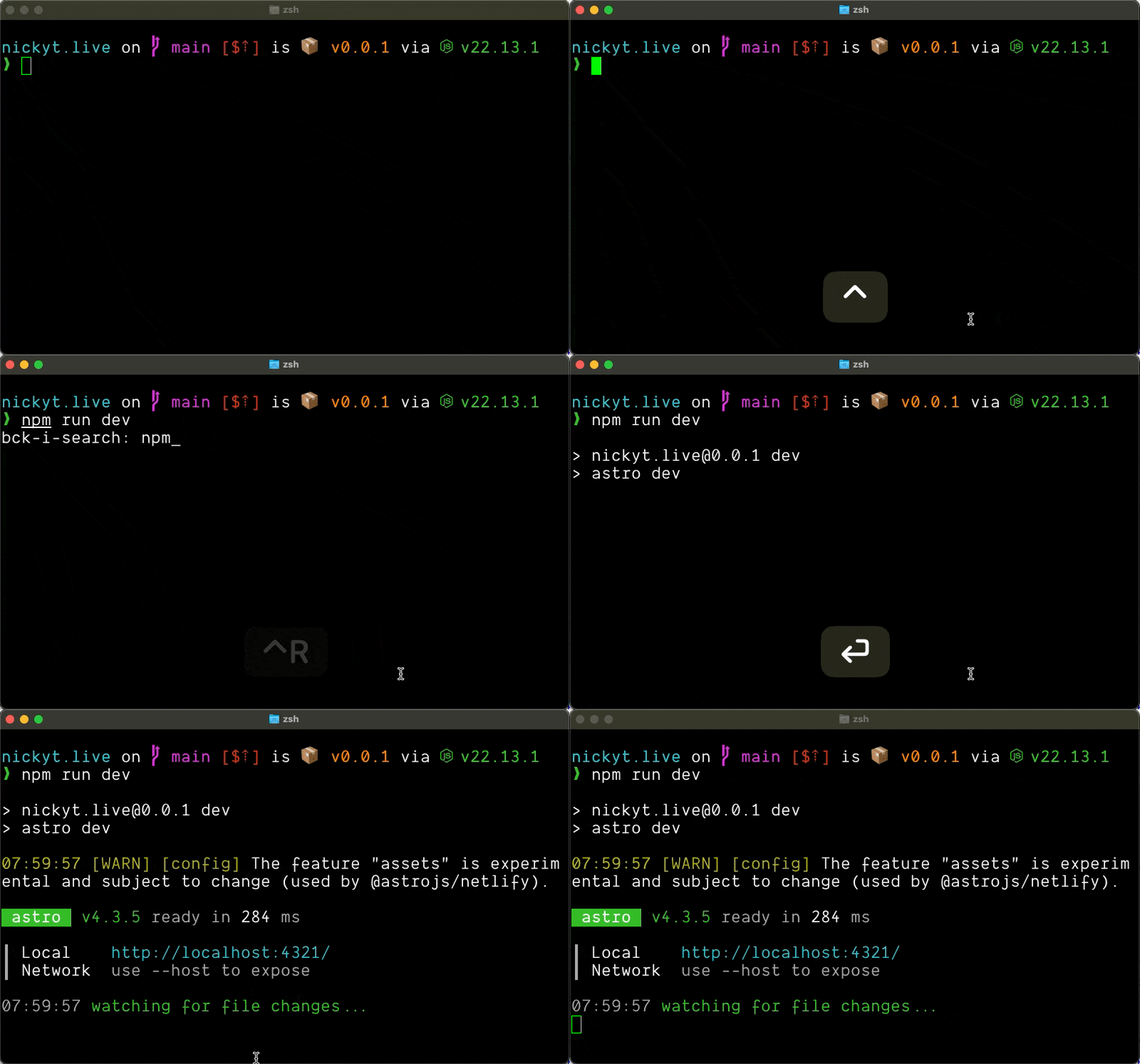
You get a single-line prompt that searches backwards through your history. No context. No ranking. No filtering by directory or recency. Just raw chronological search.
If you have a common command you run in different contexts, good luck finding the right one. You’ll be pressing CTRL + R repeatedly, hoping you land on the version you actually need.
The experience looks like this: you press CTRL + R, start typing, and if you don’t find what you want, you keep mashing CTRL + R to cycle through matches. It’s better than the up arrow, but not by much.
When you find what you want, press Enter to run it immediately, or use the left or right arrow keys to exit search and edit the command first.
For quick, simple tasks, it’s fine. For real work, you’ll feel the friction.
McFly: CTRL + R on Steroids#
I’ve been using McFly since my days working at dev.to. I can’t remember if it was my co-worker Dan or Joe who introduced me to it, but it changed how I work in the terminal.
McFly replaces CTRL + R with a full-screen, intelligent search interface.
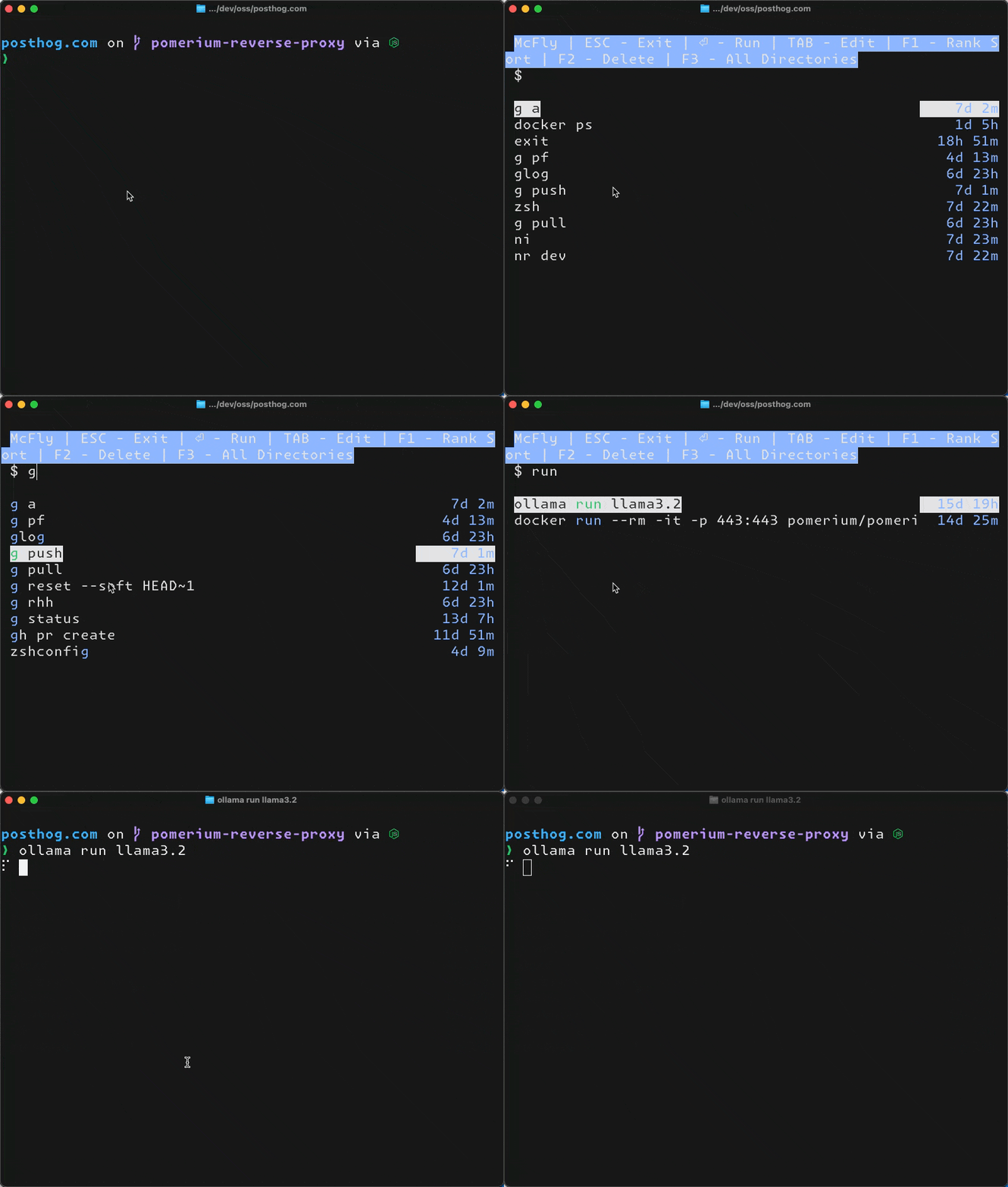
Here’s what makes it different:
- Neural network ranking - It learns which commands you actually use and prioritizes them
- Directory awareness - Commands you ran in the current directory rank higher
- Exit status tracking - Failed commands show up differently
- Full-screen UI - You can actually see what you’re searching through
- SQLite backend - Your history is stored in a proper database with timestamps and context
The search feels smarter because it is. If you frequently run npm test in one project and npm run dev in another, McFly figures out which one you probably want based on where you are.
You can also use % as a wildcard to match any number of characters, which is handy for fuzzy searching.
Press Enter to run a command immediately, or TAB to exit and edit it on the command line first. If you accidentally run a typo or want to remove a command from history entirely, just highlight it and press F2 to delete it.
McFly works on macOS, Linux, and even PowerShell on Windows. It’s written in Rust, so it’s fast.
One thing to note: McFly doesn’t handle multiline commands well. If you write complex shell functions or anything with backslash continuations, it’ll split them into separate entries or fail to import them properly.
Like all these tools, McFly uses SQLite but keeps your original .zsh_history or .bash_history file intact. You get the benefits of structured data without losing your safety net.
I wrote more about McFly in my newsletter: What’s Up McFly?
Atuin: The Full-Featured Alternative#
Atuin takes things further. I recently switched to it, and while I’m not using the sync feature, there are some compelling reasons to choose it over McFly.

Key features:
- Multiline command support - This is huge. Atuin handles multiline commands correctly where McFly splits them
- Advanced search modes - Switch between session, directory, and global search on the fly with
CTRL + R - Command duration tracking - See how long each command took to run
- Stats and analytics - Run
atuin statsto see your most-used commands and patterns - Better filtering - Search for specific exit codes, time ranges, and more
- Session tracking - Knows which terminal session ran each command
- SQLite backend - Like McFly, but with richer metadata
Here’s an example of Atuin’s advanced filtering:
# search for all successful `make` commands, recorded after 3pm yesterdayatuin search --exit 0 --after "yesterday 3pm" makeLike McFly, press Enter to run immediately or TAB to edit before executing.
To delete erroneous commands, you’ll need to use the command line: atuin search --delete <query> will remove all matching entries. There’s no F2-style UI shortcut like McFly has, but the command-line approach gives you more control over bulk deletions. Not a deal breaker for me. That said, F2 deletion has been a popular feature request, so feel free to subscribe to that issue to know when/if it ever lands.
McFly doesn’t have this level of query flexibility.
About Sync (Optional)#
Atuin’s most marketed feature is cloud sync, but it’s completely optional. I don’t use it, and the tool is still worth it for the local benefits alone.
If you do want sync:
- Everything is end-to-end encrypted before leaving your machine
- You can use Atuin’s hosted server or self-host your own
- Even on Atuin’s servers, they can’t see your commands because of client-side encryption
- Your local history database is not encrypted (it’s stored in plaintext SQLite so search can be fast)
Security-conscious folks will probably opt for self-hosting if they want sync at all.
Your History Files Stay Safe#
Like McFly, Atuin doesn’t replace or delete your original shell history file. Both exist:
- Atuin stores everything in
~/.local/share/atuin/history.db(SQLite) - Your
.zsh_historyor.bash_historystays intact and continues to be updated - When you install Atuin, you import your existing history into the database
- If you ever stop using Atuin, your traditional history is still there
You get structured data for powerful searching plus your text-based history as a fallback.
Performance Considerations#
Shell startup time matters. I recently sped up my shell startup by 95% by lazy-loading tools that were slowing me down.
https://www.nickyt.co/blog/how-i-used-claude-code-to-speed-up-my-shell-startup-by-95-m0fBoth McFly and Atuin add some initialization time, but it’s minimal compared to tools like nvm or pyenv. We’re talking single-digit milliseconds.
If you’re optimizing your .zshrc, neither tool will be your bottleneck.
Which One Should You Use?#
Stick with out of the box if:
- You’re happy with basic search
- You rarely reuse complex commands
- You don’t want to install anything
Use McFly if:
- You want smarter search without extra complexity
- You work in multiple projects with similar commands
- The neural network ranking appeals to you
- You don’t write many multiline commands
- You value simplicity and quick deletion with F2
Use Atuin if:
- You write multiline shell functions or complex commands
- You want advanced filtering and search modes
- You like stats and analytics about your workflow
- You want the option to sync across machines (even if you don’t use it now)
- You want more control over search context switching
Personally, I switched from McFly to Atuin primarily because of multiline command support. The advanced filtering and stats are nice bonuses, but being able to properly recall complex shell functions was the dealbreaker for me.
I know some users have reported lag and freezing when typing when using Atuin, but this is when your history hits about the 6K records mark. If I do run into this, I’ll simply add a script to run a periodic purge as I highly doubt a command I haven’t touched in 60-90 days will be touched again. 😅
Try Them Out#
Both McFly and Atuin are open source and easy to test:
Install one, use it for a week, and see if you want to go back. I’m betting you won’t. Lemme know in the comments!
If you want to stay in touch, all my socials are on nickyt.online.
Until the next one!
Photo by Content Pixie on Unsplash